
Blue Tees GAME: AI Golf GPS
Blue Tees GolfSports
4.8225.00 Reviews
- Version
- 1.17.0
- Installs
- 50.00K
- Age Rating
- Everyone
Screenshots
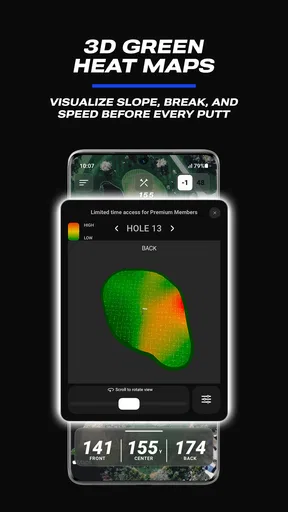
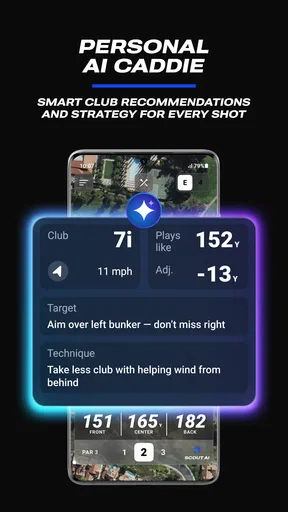
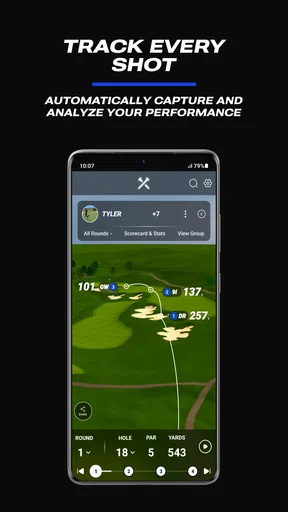
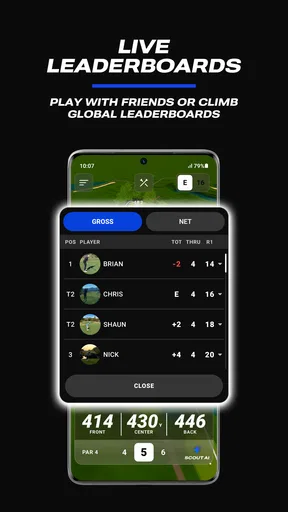
Our Review of Blue Tees GAME: AI Golf GPS
 Analysis by Appyee
My first expectation for Blue Tees GAME: AI Golf GPS would be a practical round companion, not a replacement for learning the course or making my own decisions. It is a free sports app from Blue Tees Golf, and its focus is on bringing course maps, scoring, stats, and caddie-style guidance together. That mix makes sense if I want fewer separate tools to juggle while playing, but it also means the app is most useful when I’m willing to interact with it during a round.
Who gets the most from a golf companion app
I’d recommend trying it if you play often enough to care about patterns in your rounds, or if you’re still learning how to plan shots instead of simply aiming toward the green. A newer golfer may find it helpful to have distances and hole information in one place, while a more experienced player may value keeping scores and stats together. The app is rated for Everyone, and its average rating is 4.9 from around 3,300 ratings, with over 50,000 installs.
It may be less appealing if you prefer to leave your phone in the bag and play by feel, or if you already have a golf watch or another app that fits your routine perfectly. A phone-based tool asks you to check the screen and, depending on how you use it, enter information. That small interruption can feel worthwhile when you’re learning, but distracting when you want an uninterrupted walk around the course.
Getting ready before the first tee
I’d start by installing the app and taking a few minutes to explore its layout before arriving at the course. The key first question is whether the course you plan to play is available in the app. Maps are only useful if they cover your venue, so checking that ahead of time avoids discovering a mismatch while your group is waiting to tee off. I’d also make sure my phone is charged; using a GPS-focused app throughout a round is a good reason to begin with plenty of battery.
On the first visit, resist the temptation to configure every stat or feature at once. Choose a simple goal, such as keeping score or checking hole distances, and learn that flow first. Then add more tracking if it genuinely helps you. This is a useful trade-off: more detail can make later reflection richer, but too much tapping during play can slow you down and pull attention away from your shot.
A first round that feels manageable
For a first successful use, I’d open the relevant course map before starting and use it to orient myself on the opening hole. Check the distance information, make a club decision using your own experience, and then focus on playing rather than repeatedly refreshing the screen. After the hole, record the score or any other information you want to remember. That small routine gives the app a clear job without turning a relaxed round into a data-entry session.
A realistic example is a weekend round at a course I don’t know well. Before a tee shot, I can use the map and GPS information to get a better sense of the hole, then make my own choice based on the lie, wind, and how confidently I hit each club. If I’m unsure why a hole cost me strokes, keeping a score and selected stats gives me something concrete to review afterward. I wouldn’t expect a screen to make the shot for me; the value is in helping me notice the decisions and results I might otherwise forget.
Using it on the course and after the round
The app’s store summary points to an AI caddie, stats, scores, and maps, and that combination is its main appeal. Rather than treating GPS as a standalone distance readout, I’d use the map as a planning aid and scoring as a record of what happened. The useful habit is to gather just enough information to answer a question later: Did I choose sensible targets? Which parts of my game felt reliable? That kind of review is more actionable than entering everything simply because the option exists.
How it fits beside familiar alternatives
Compared with a paper scorecard, a phone app can keep more than a basic score in one place and make it easier to look back at recorded rounds. Compared with a golf watch, a phone offers a larger map view, while a watch may be easier to glance at without taking a phone out. Those are different conveniences, not a universal winner. If quick, hands-free checks matter most, a watch may suit you better; if you want a visual map and are comfortable using your phone, this app’s approach is more natural.
It also differs from simply asking a playing partner for a yardage: the app can give you a consistent reference and help you keep track of your own round. But a caddie or experienced local golfer can account for conditions and course quirks in a way a screen cannot automatically replace. I’d treat the app as a second opinion and planning aid, not as authority over every shot.
Small habits that make the app more useful
One practical tip is to decide before teeing off which information you actually want to capture. If you’re working on course management, note the score and focus on the choices that led to it; if you’re trying to understand consistency, track only the stats that help answer that question. A narrow focus makes your records easier to interpret later and keeps your attention where it belongs during play.
Another helpful approach is to use the map before you reach the ball, when there’s time to think, rather than stopping over every shot to inspect the screen. I’d also review the round soon afterward while the important moments are still fresh. A number without context can be hard to learn from; remembering that a poor result came after a risky target or an awkward lie gives the record meaning.
What to keep in mind as a new user
GPS information is only one part of a golf decision. Your lie, the conditions, your comfort with a club, and the safe side of a hole all matter, so I wouldn’t follow a suggested plan blindly. The app can help organize what you see, but judgment remains yours. Likewise, tracking works best when you enter information consistently; sporadic notes may leave gaps that make comparisons less helpful.
There is also a choice between convenience and attention. Pulling out a phone is easy for some players, but it can disrupt pace or concentration if done before every shot. I’d keep the routine brief and use the app at natural pauses. If you’re playing with someone who dislikes devices on the course, agree on a low-key approach so the tool doesn’t become a distraction for the group.
Costs, compatibility, and expectations
The app is free to download, with in-app purchases ranging from $14.99 to $99.99 per item. I’d begin with the free experience and decide whether the parts I actually use justify spending anything; there’s no reason to pay before I know the app fits my rounds. Its current version is 1.13.1, and the minimum operating system is 10, so checking that your device meets the requirement is a sensible step before installing.
For a first-time user, the best measure of success is not whether every feature gets used. It’s whether the app helps make one decision clearer or gives you a useful record after a round. If your main need is only a quick distance glance and you already have a preferred device for that, switching may add little. If you want maps and scoring in a single phone-based routine, it is worth testing on a course you know before relying on it somewhere unfamiliar.
If you’re anything like me, golf isn't just a game—it's a passion. And in this digital age, we have a new best friend on the course: Blue Tees GAME: AI Golf GPS. This app promises to make your golfing experience smarter, easier, and, dare I say, more fun. So, I downloaded it, teed up, and hit the links to see how it stacks up.
First Impressions and Features
From the get-go, the app impresses with a sleek and intuitive interface. You don't need to be a tech whiz to navigate it. The app is designed to be user-friendly, which means less time fiddling with your phone and more time focusing on your swing.
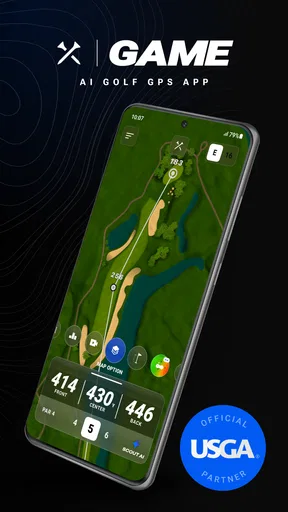
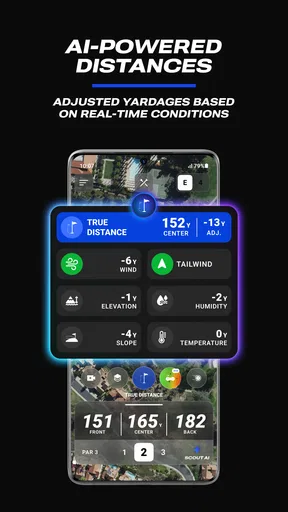
One of the standout features is the AI-powered GPS. Imagine having a personal caddie in your pocket that knows the course like the back of its hand. The GPS provides real-time data, so you know exactly how far you are from the hole, any hazards, and the best routes to take. It’s like having an eagle eye on every hole.
Performance on the Course
Now, let’s talk about how it performs when you're out there playing. The GPS accuracy is top-notch. I tested it on a couple of courses, and it consistently provided precise yardages. This precision can be a game-changer, especially if you’re trying to shave a few strokes off your score.
Another cool feature is the shot tracking. The app allows you to log your shots, analyze your performance, and even offers suggestions for improvement. It’s like having a coach who’s always by your side, helping you refine your game.
AI Insights and Customization
The AI insights are where the app truly shines. It takes your data and gives you personalized tips. Whether it’s recommending the best club for a particular shot or suggesting a different strategy on a challenging hole, the AI adapts to your style of play. It’s personalization at its finest.
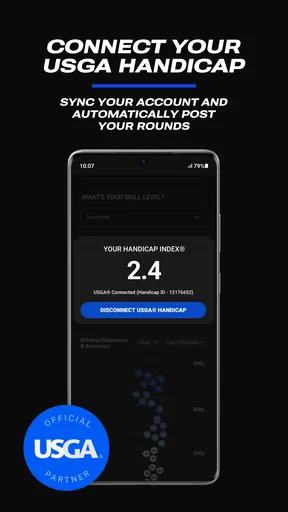
Customization options are abundant. You can set preferences based on your skill level, track specific stats, and even receive notifications about upcoming weather conditions that could impact your game. It’s all about making your golfing experience as tailored as possible.
Interactive and Social Features
But wait, there’s more! The app includes some nifty social features. You can connect with friends, compare scores, and even participate in virtual tournaments. It’s a great way to add a social element to your golfing routine, especially if your buddies are scattered across different locations.
There’s also an integrated leaderboard, which can add a competitive edge to your rounds. It motivates you to improve and climb the ranks, all while having a blast on the course.
Usability and Accessibility
Let’s not forget about usability. The app runs smoothly on both Android and iOS, without any noticeable lag or crashes during my testing. The developers have done a stellar job ensuring it’s stable and reliable.
In terms of accessibility, the app supports multiple languages, making it user-friendly for golfers around the globe. It’s those little touches that make a big difference in user experience.
Final Thoughts
So, is Blue Tees GAME: AI Golf GPS worth downloading? Absolutely. Whether you’re a seasoned pro or a weekend warrior, this app has something to offer. The combination of precise GPS, insightful AI, and engaging social features makes it a must-have for any golfer looking to elevate their game.
With its intuitive design and powerful features, it’s like having a personal coach, caddie, and scoreboard all in one app. So go ahead, give it a try, and see how it transforms your golfing experience. After all, anything that helps you play better golf is always a hole in one in my book!
Verdict
Strengths of Blue Tees GAME: AI Golf GPS
- Accurate GPS tracking enhances gameplay.
- Intuitive interface for easy navigation.
- AI suggestions improve golfing strategies.
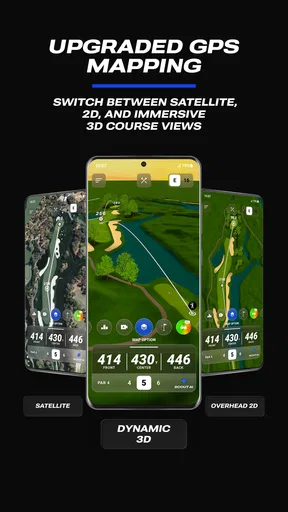
- Detailed course maps for better planning.
- Customizable settings for personalized use.
Limitations of Blue Tees GAME: AI Golf GPS
- Requires stable internet for full features.
- Battery consumption is relatively high.
- Limited offline functionality available.
- Subscription needed for premium features.
- Occasional lag on older devices.
Similar Picks in This Category
View All
BeSoccer: Soccer Live Score
BeSoccer apps4.3

Cricbuzz - Live Cricket Scores
Cricbuzz.com3.7

NFL
NFL Enterprises LLC2.4

Da Fit
MO YOUNG LIMITED3.6

ESPN
Disney4.5

LiveScore: Live Sports Scores
LiveScore Limited4.5
Frequently Asked Questions
What features does Blue Tees GAME: AI Golf GPS offer?
Blue Tees GAME: AI Golf GPS provides a comprehensive range of features including accurate GPS tracking, AI-driven club recommendations, and detailed course maps. Users can also enjoy real-time weather updates, shot tracking, and performance analytics to enhance their golfing experience. The app’s user-friendly interface ensures easy navigation through all its features.
Is Blue Tees GAME: AI Golf GPS available for both Android and iOS devices?
Yes, Blue Tees GAME: AI Golf GPS is available for download on both Android and iOS platforms. Users can find the app on the Google Play Store for Android devices and the Apple App Store for iOS devices. Regular updates ensure compatibility and new features across both operating systems.
Does the app require a subscription or one-time purchase?
Blue Tees GAME: AI Golf GPS offers both free and premium subscription options. The free version includes basic features, while the premium subscription unlocks advanced functionalities like AI club recommendations and in-depth performance analytics. Users can choose the plan that best suits their golfing needs and budget.
How accurate is the GPS functionality in Blue Tees GAME: AI Golf GPS?
The GPS functionality in Blue Tees GAME: AI Golf GPS is highly accurate, utilizing advanced satellite technology to provide precise distance measurements. This accuracy helps golfers make informed decisions on the course. Regular updates ensure that the GPS data remains reliable and up-to-date, enhancing overall user experience.
Can beginners benefit from using Blue Tees GAME: AI Golf GPS?
Absolutely. Blue Tees GAME: AI Golf GPS is designed to cater to golfers of all skill levels, including beginners. The app’s AI-driven club recommendations and detailed tutorials help newcomers understand the game better. Beginners can track their progress and improve their skills using the app’s performance analytics and shot tracking features.
